Knows what's on air
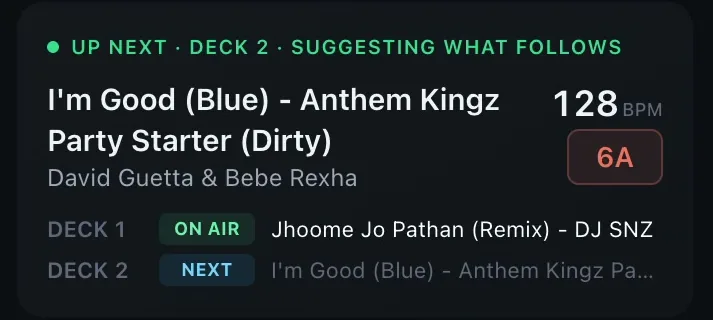
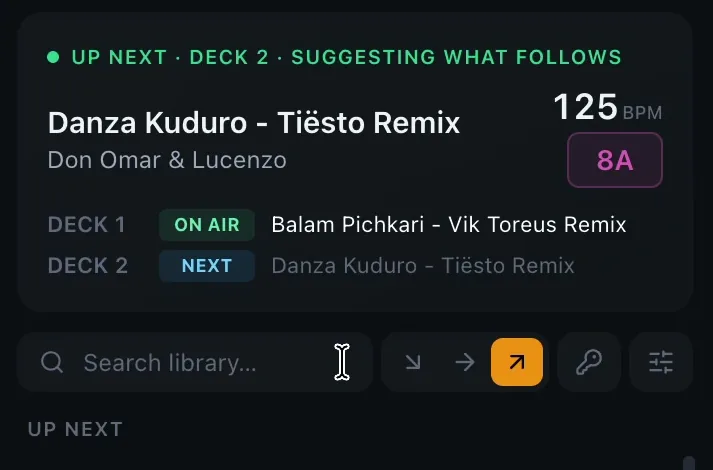
Live deck detection straight from Serato: ON AIR for what the crowd hears, NEXT for what you've cued. Suggestions follow your latest load, so you're always planning one track ahead.
Invite-only beta · Mac & Windows
The copilot for Serato DJ Pro — knows what's on air and suggests what's next, in key and in tempo.
Works with Serato DJ Pro 4 and older. Reads your library read-only — nothing leaves your computer.
How it works
DJ exactly like you do today. NextTrack floats beside Serato as a slim panel — or hides with ⌘⌥N.
It sees what's on air and what's cued the moment you load it, then ranks your whole library for what comes next.
Hit ‹ 1 or 2 › and the pick lands on the free deck. Play, sync, blend.
Features
Live deck detection straight from Serato: ON AIR for what the crowd hears, NEXT for what you've cued. Suggestions follow your latest load, so you're always planning one track ahead.
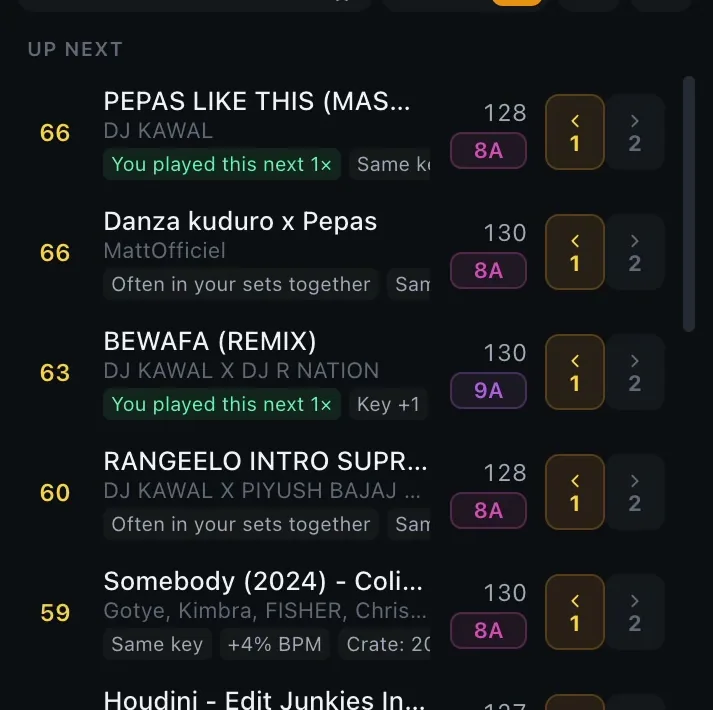
Every pick shows why: same key or a harmonic move, BPM delta, shared crates — and "You played this next 3×" from your own history.
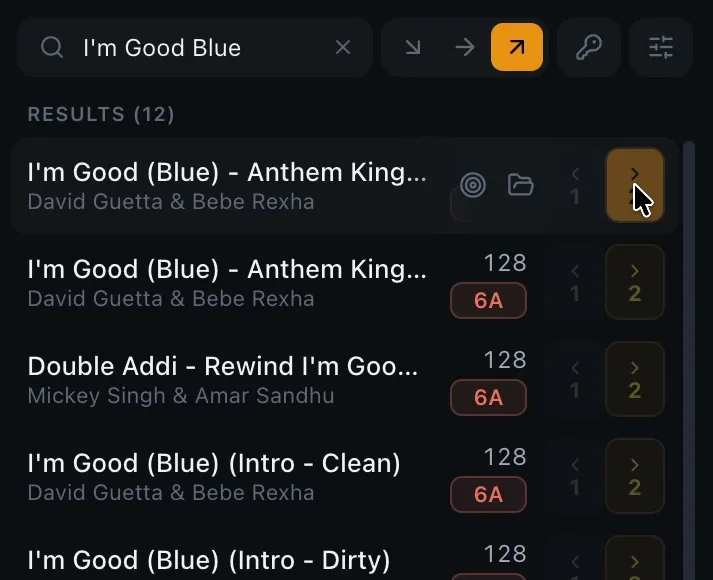
No dragging, no scrolling Serato's browser mid-set. Click the deck button and NextTrack loads the exact edit — Clean, Dirty or Intro — then double-checks Serato got it.
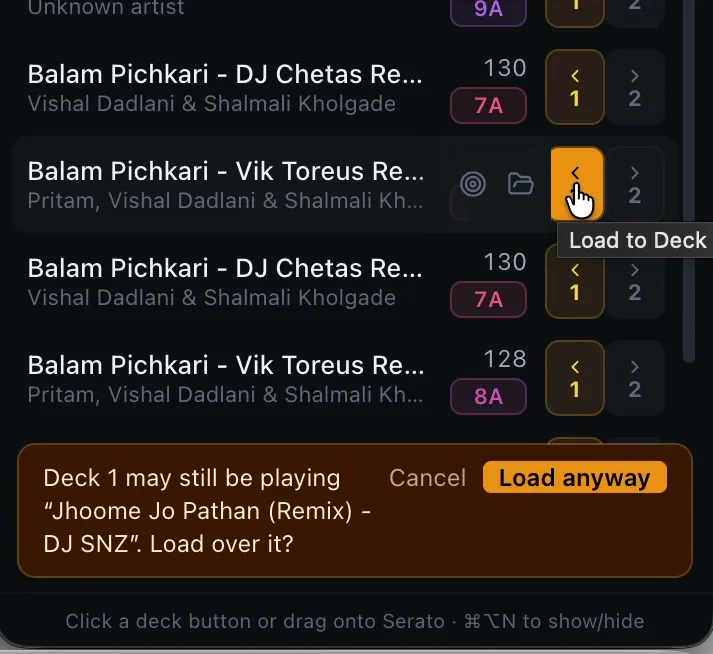
If the target deck might still be playing, NextTrack asks first. Your set stays safe even when you're moving fast.
Steer the energy. Build-up mode walks the Camelot wheel upward and nudges the BPM; bring-down eases off. Lock to harmonic-only when you need it clean.
Hundreds of past Serato sessions become transitions it trusts. It knows what you play next — not what an algorithm thinks a stranger would.
Built for real sets
From Bollywood remixes to club edits, NextTrack keeps the floor moving without a clash. This is the exact chain from our demo — every blend a harmonic move, locked at 125 BPM.
Private by design
Runs entirely on your computer. Works offline at the gig.
Reads your Serato library and history — never writes to or changes them.
Your library, history and crates never leave your machine.
Just your invited email and a 6-digit code. No passwords, and nothing about your music is sent.
FAQ
Serato DJ Pro 4 (including its new library database) and earlier Serato DJ Pro / Serato DJ versions that use the classic _Serato_ folder. NextTrack finds your libraries automatically, including on external drives.
Yes — there are downloads for both. One-click loading onto a deck works on macOS today and is in beta on Windows. On either, you can also drag any suggestion straight onto a Serato deck.
No. NextTrack opens your library and history strictly read-only. It never edits tags, crates or history.
One-click loading uses Serato's own keyboard shortcuts to search and load the track, which macOS only allows for apps you approve under System Settings → Privacy & Security → Accessibility. Everything else works without it, and you can always drag instead.
They're planned. NextTrack is built so other DJ software can plug in without changing how recommendations work — Serato comes first.
Free during the invite-only beta.
Request an invite below. We send a personal download link to your email as beta spots open.
Yes — sign in once with your invited email and a 6-digit code. After that NextTrack keeps working offline for up to 6 hours since it last checked in online, and it checks in automatically whenever you're connected — so open it online before the gig.
NextTrack is invite-only while we're in beta. Tell us who you are and we'll send your personal link as spots open.
We'll email your personal invite link as soon as a spot opens.
Already invited? Check your email for your link.